Enhancing Design with the Yellow Text Effect 3D Vintage Style in Adobe Illustrator
Graphic design is an ever-evolving field that thrives on creativity and innovation. Whether you're a professional designer, a hobbyist, or someone just starting out, having access to tools that streamline your workflow and elevate your visual output can make all the difference. One such tool that has gained popularity among Adobe Illustrator users is the Yellow Text Effect 3D Vintage Style. This ready-to-use text effect offers a unique blend of color, dimension, and nostalgia, making it ideal for a wide range of design projects.
What Is the Yellow Text Effect 3D Vintage Style?
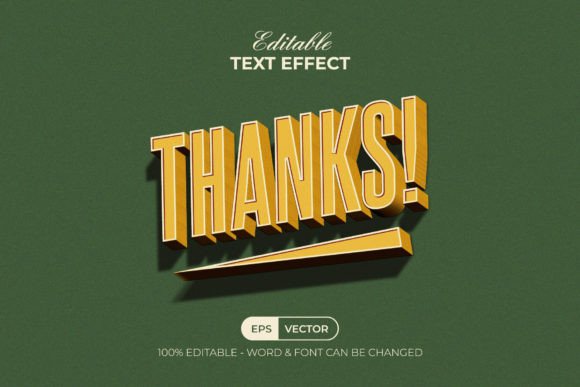
The Yellow Text Effect 3D Vintage Style is not a font but rather a graphic style designed specifically for Adobe Illustrator. It allows users to apply a pre-made 3D yellow vintage aesthetic to any text or shape they create. The effect includes elements like lighting, shading, depth, and texture that mimic aged paper or retro signage, giving your designs a timeless look.
This text effect is particularly useful for those who want to incorporate a nostalgic vibe into their work without spending hours manually adjusting each layer or element. Once installed, the effect appears in the Graphic Styles panel, where you can simply select your text or shape and apply the style with one click.
Design Features That Make It Stand Out
Several key features distinguish the Yellow Text Effect 3D Vintage Style from other similar tools:
- Easy to Edit: Unlike some effects that are rigid once applied, this one allows full customization after application. You can tweak colors, adjust dimensions, and modify lighting to better suit your project’s needs.
- Well-Organized Layers: The structure of the effect is clean and methodical, making it easier to understand how each component contributes to the final result. This organization is especially helpful for beginners learning how to manipulate vector graphics.
- 100% Editable Text and Font: You have complete freedom over the typography. Choose any font you prefer and apply the effect afterward, ensuring your message is both stylistically appealing and clearly legible.
- RGB Color Support: Designed with digital platforms in mind, the effect uses RGB color mode, which ensures vibrant and accurate color reproduction on screens.
- Free Fonts Used: All fonts included in the demonstration files are free to use, removing potential licensing hurdles and allowing designers to focus on creativity without additional costs.
- Read Me File Included: A detailed Read Me file comes with the package, guiding users through the installation process and offering tips on how to best utilize the effect. It also contains links to download the free fonts used in the examples.
Files Included in the Package
When purchasing or downloading the Yellow Text Effect 3D Vintage Style, you'll receive multiple formats to ensure compatibility and ease of use across different workflows:
- EPS File: Ideal for print projects and high-resolution outputs.
- AI File: Perfect for working within Adobe Illustrator for further customization.
- JPEG Preview: A visual reference of how the effect looks when applied, helping you decide if it fits your design goals.
- Read Me TXT: Contains setup instructions, font sources, and usage notes to help you get started quickly.
Suitable Applications and Use Cases
The Yellow Text Effect 3D Vintage Style is versatile and can be applied in various creative contexts. Here are some common use cases where this effect shines:
- Poster Design: When creating event posters or promotional materials that evoke a sense of history or charm, applying this effect gives the text a rich, textured appearance that stands out.
- Logo Concepts: For logos that aim to communicate warmth, authenticity, or tradition, the 3D vintage yellow tone adds character and visual interest.
- Editorial Projects: Magazine covers, book titles, or headers for articles benefit from the distinctiveness of this style, especially when targeting niche audiences or themes related to retro aesthetics.
- Web and App UI Elements: The effect can be used subtly in user interfaces to highlight key sections or buttons, blending modern functionality with classic design elements.
- Branding Materials: Business owners or marketers can leverage this effect in branding assets such as brochures, packaging, or social media content to stand out visually while maintaining a cohesive theme.
Who Can Benefit from Using This Effect?
The Yellow Text Effect 3D Vintage Style is suitable for a broad audience due to its simplicity and adaptability. Here's how different professionals might find value in using it:
- Graphic Designers: Quickly enhance text-based designs with a polished, vintage-inspired look without compromising on quality or flexibility.
- Marketing Professionals: Create eye-catching campaigns with themed visuals that resonate emotionally with target audiences, especially for products with historical or artisanal appeal.
- Educators and Students: Teach or learn about applying complex styles through a simplified interface. The effect serves as a great educational tool for understanding layers and effects in Illustrator.
- Business Owners: Improve brand visibility by incorporating distinctive typography into marketing collateral or website banners.
- Hobbyists and Artists: Experiment with vintage-style compositions in personal art projects, greeting cards, or illustrations.
How to Implement the Yellow Text Effect 3D Vintage Style
Using the Yellow Text Effect 3D Vintage Style is straightforward. After downloading the package, follow these steps:
- Open Adobe Illustrator (CC or newer).
- Go to the Graphic Styles panel and load the provided .ai file or drag the style into the panel.
- Create a new text box or shape and input your desired text.
- Select the text and choose the Yellow Text Effect 3D Vintage Style from the Graphic Styles menu.
- Customize the effect as needed using the layers and properties available in the file.
This seamless integration makes it easy for even novice users to experiment with professional-level styling techniques.
Advantages Over Manual Creation
Creating a 3D vintage text effect manually in Adobe Illustrator requires a deep understanding of layering, gradients, shadows, and lighting effects. While this approach offers more control, it is time-consuming and often beyond the skill level of many users. The Yellow Text Effect 3D Vintage Style eliminates the need for advanced technical knowledge by providing a ready-made solution that balances artistic flair with usability.
Some of the main advantages include:
- Time Efficiency: Save hours of work by applying a professionally crafted effect instantly.
- Consistency: Maintain a uniform look across multiple design pieces without repeating the same laborious steps.
- Accessibility: Users at all experience levels can take advantage of this effect, regardless of their familiarity with Illustrator's advanced tools.
- Flexibility: Each component of the effect is editable, allowing for endless variations and adaptations to fit specific design needs.
Considerations When Using the Effect
While the Yellow Text Effect 3D Vintage Style is incredibly useful, there are a few considerations to keep in mind to maximize its effectiveness:
- Font Choice Matters: Although the effect works with most fonts, some may clash with the vintage aesthetic. Opt for serif or slab-serif fonts to maintain consistency with the overall theme.
- Background Compatibility: The yellow vintage tones may not show up well on all backgrounds. Test the effect against different colors or textures to ensure readability and visual impact.
- Resolution Requirements: If preparing for print, confirm that the resolution settings are appropriate and that no raster elements interfere with scalability.
- Software Version: The effect is compatible with Adobe Illustrator CC and later versions. Older versions may not support all features or could require manual adjustments.
Real-World Examples and Observations
In practice, the Yellow Text Effect 3D Vintage Style has been used effectively in several real-world scenarios. For instance, a local coffee shop utilized this effect in their logo and seasonal menus to reflect a cozy, handcrafted atmosphere. Similarly, a music festival poster incorporated the style to evoke the golden age of vinyl records and analog sound.
Another example is a lifestyle blog that redesigned its website using the effect for headlines and call-to-action buttons. The warm yellow tones helped establish a welcoming and vintage feel, aligning with the blog's thematic content and increasing reader engagement.
Why Choose the Yellow Text Effect 3D Vintage Style?
Designers often seek tools that simplify complex processes while still delivering high-quality results. The Yellow Text Effect 3D Vintage Style meets this demand by combining accessibility with artistic sophistication. Its ability to transform ordinary text into something visually striking without requiring extensive skills makes it an excellent choice for both casual users and seasoned professionals.
Moreover, the inclusion of a JPEG preview and a detailed Read Me file ensures that users can implement the effect with confidence. The emphasis on using free fonts also makes it an attractive option for those looking to minimize costs without sacrificing design integrity.
Staying Ahead with Nostalgic Trends
Vintage aesthetics continue to influence modern design trends, from fashion to digital media. As audiences gravitate toward styles that evoke memory and sentimentality, tools like the Yellow Text Effect 3D Vintage Style allow creators to tap into this cultural shift effortlessly.
By integrating this effect into your workflow, you’re not only saving time but also staying aligned with current design sensibilities. It bridges the gap between traditional craftsmanship and digital efficiency, empowering you to produce compelling visuals that resonate with today’s consumers.
Final Thoughts on the Yellow Text Effect 3D Vintage Style
The Yellow Text Effect 3D Vintage Style is a valuable asset for anyone involved in graphic design. Whether you're enhancing a logo, crafting a poster, or designing a website, this effect provides a powerful way to infuse your work with character and depth. Its combination of ease-of-use, customizability, and compatibility with Adobe Illustrator makes it a go-to solution for adding a touch of vintage charm to your projects.